
You can include a section on an event landing page that'll recommend other related events--a great way to encourage people to attend more. We include this section in our default templates.
This isn't really a part of the Elevent plugin, per se, but it works well with Elevent Events and how they can be categorized. These are mere examples of some of the ways to accomplish recommended/related events.
In Elementor
Add a Posts block to your single event landing page template.
Choose the Posts block you added and edit the options in Elementor--find the Query section and expand that. Change the source to Elevent Events.
In the preview, you should already see other Elevent Events display there.
Curating the suggested events
If you have a lot of events, you'll probably want a less randomized set of suggested events.
In the query section, change the source to Related
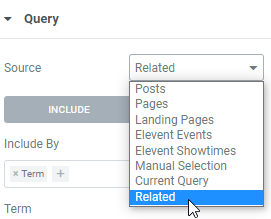
For the term field, choose the taxonomy you want to consider as "related" events.
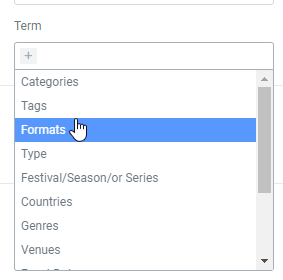
For instance, if you choose the term "genres", the suggested events that display here will be other events with a matching genre.
In Other Page Builders
There are a variety of blocks and related posts plugins available. Shop around till you find one that supports custom post types and can suggest related posts by a taxonomy of your choosing. Most any Related Post WordPress plugin can do the job--explore some here.
What went wrong? (Optional)