
As you create your schedule in Elevent, syncing to the website will create Elevent Showtimes for each ticketable instance. This article will teach you how to build on top of the showtime information that Elevent uses to fuel your website.
Elevent Showtimes are not landing pages unto themselves; they are individual ticketable instances of each event and fuel the ticketing, filtering, venue assignment, and display involved in their parent events and the plugins ticketing widgets.
The Relationship Between Events and Showtimes
One Elevent Event must have one or more Elevent Showtimes. When these are synced from Elevent, the relationship between the two is automatically created.
If you inspect an Elevent Event in WordPress, you will see that association under Showtimes.

Customizing Showtime Data
A modest amount of data exists on each showtime. If you navigate to any Elevent Showtime in WordPress, you'll see 2 tabs of fields.
On any Elevent Event, you'll see 2 tabs of fields.
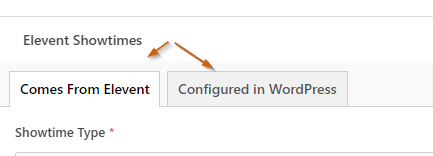
All of the information in the "Comes From Elevent" tab should not be touched--any changes you make will be overwritten on the next sync.
You are free to make changes in the "Configured in WordPress" tab, including:
- Geoblocking Warning: For any streaming videos that will only play in certain geographical regions, you can warn the buyer before they put tickets in their cart that the video may not be viewable in their area. Elevent will also detect where they are purchasing from based on their payment card, but that is not foolproof.
- Member Access: If your members at certain tiers have special or preferential access to a specific showtime, you can make that known
- Special Showtime Attributes: Each showtime may have specific accessibility, features, or production aspects unique to them--you can display icons or text on your event templates to make that known.
- Venue Description: If there are special instructions about the venue to display on a specific showtime, you can include that here
Even More Fields
Between the synced data and the additional customizations you can do, most scenarios should be covered. There are times when you might need to have your own custom fields on Elevent Showtimes.
If you need more fields and data than you see here, learn more about Extending Events with Custom Data here.
What went wrong? (Optional)